
Real results
See the difference our AI photo editor makes
Professional-quality photo edits with simple chat commands. Drag each frame to compare.
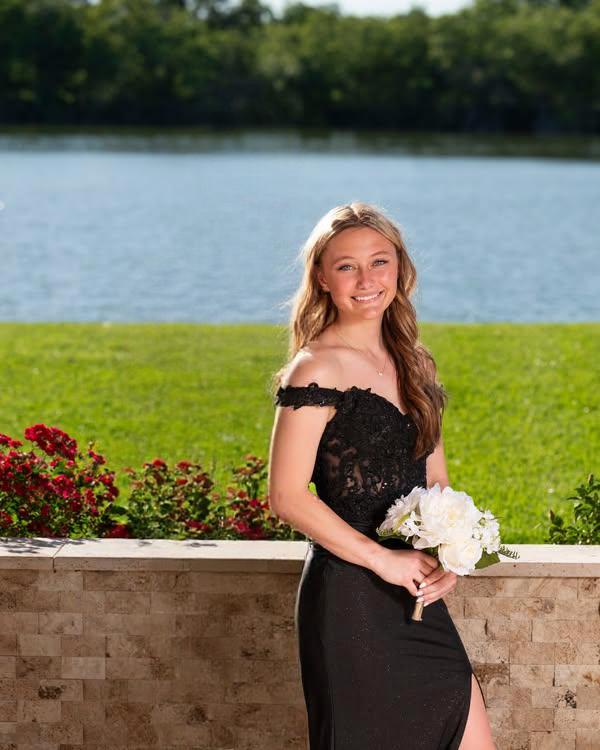
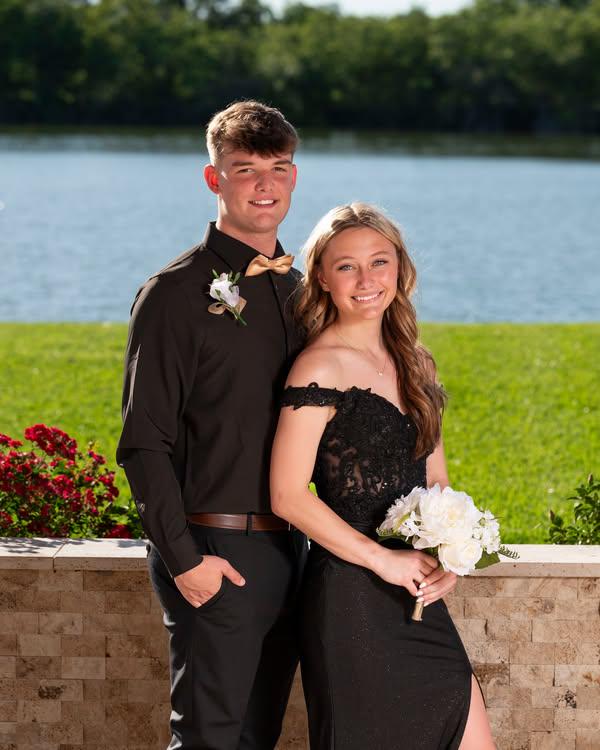
Remove People & Objects
Try it free →Remove unwanted people, objects, or distractions from your photos with simple commands like "remove the person in the background" or "delete the trash can."
High Quality Professional Results
Try it free →Studio-quality edits that look natural and seamless, delivered in seconds with AI precision and professional attention to detail.
Capabilities
Nine powerful photo edits, all from chat
From background removal to hair color changes — every edit is a sentence away.
Background Removal
Remove or replace backgrounds with professional precision
"Remove the background"
"Replace background with beach scene"
Object Removal
Erase unwanted objects, signs, or distractions
"Remove the trash can"
"Delete the power lines from the sky"
People Removal
Remove unwanted people from photos
"Remove the person in the background"
"Delete the tourist from my photo"
Lighting & Exposure
Fix dark photos and improve lighting
"Brighten this dark photo"
"Fix the overexposed sky"
Skin Smoothing
Remove blemishes and smooth skin naturally
"Smooth my skin naturally"
"Remove blemishes from face"
Hair Color Change
Try new hair colors and styles virtually
"Change my hair to blonde"
"Make my hair purple"
Color Grading & Filters
Apply cinematic filters and aesthetic color grading
"Apply vintage film filter"
"Make it look cinematic"
Smart Crop & Resize
Perfect crops for social media and different platforms
"Crop for Instagram square"
"Resize to 1920x1080"
Add Text & Graphics
Add text, quotes, or graphics to your photos
"Add 'Summer 2024' text"
"Put a heart emoji on the corner"
In action
Just chat to transform your photos
No complicated tools or sliders — describe the change and the AI handles the rest.
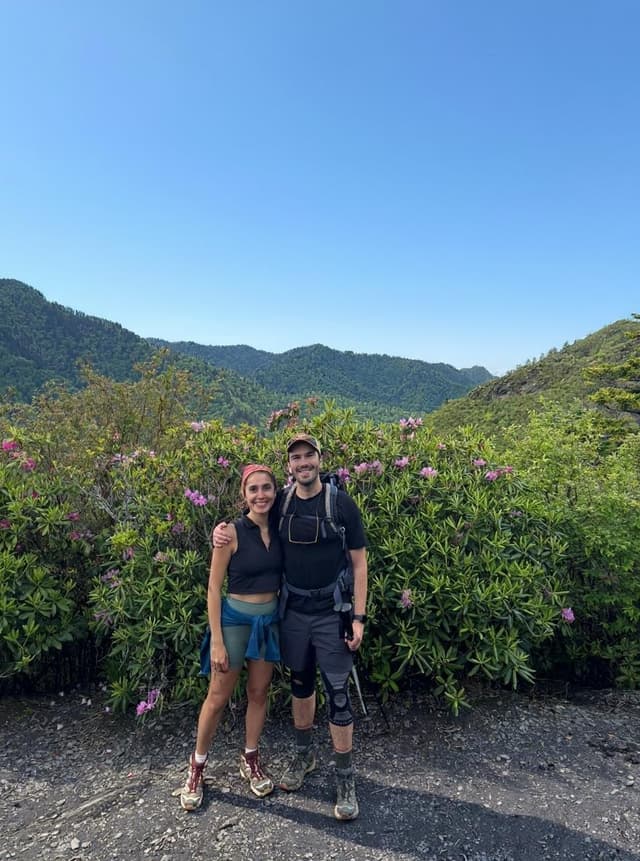
"Can you please make the background weather sunny?"
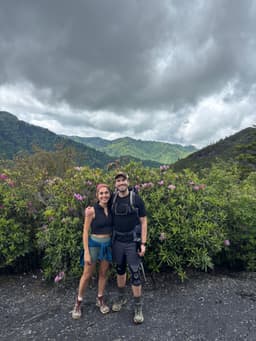
Here's your sunny weather transformation:


How we compare
Photo editing made as simple as chatting
| Feature | CarePhoto | Editing software | Manual retouching |
|---|---|---|---|
| How you edit | Plain-English chat | Sliders, layers, menus | Hand-drawn masks |
| Learning curve | None — just describe it | Steep | Steep |
| Time per edit | 10–30 seconds | Minutes to 30+ min | 30+ minutes |
| Price | From $7.99/mo | Varies by plan | Quoted per project |
| Background removal | Built in | Add-on / plugin | Manual cut-out |
How it works
Three steps, about thirty seconds
Upload your photo
Upload the photo you want to edit by clicking the upload button or dragging and dropping your image into the chat interface.
Describe your edit
Type a natural-language description of what you want — "Remove the background," "Make the weather sunny," "Remove the person in the background," or "Smooth the skin."
Get your edited photo
The AI processes your request and returns a professionally edited photo in about 10–30 seconds. Download it, or keep chatting to make more edits.
The detail
What is a chat-based AI photo editor?
A chat-based AI photo editor lets you request changes with plain-English commands instead of selecting every layer, mask, and slider manually. Upload a photo and describe what you want — "remove the background," "brighten this dark photo," or "change my hair to blonde." CarePhoto can handle background and object removal, lighting changes, skin retouching, color grading, cropping, and text overlays. Generation time varies, and complex edges or details can require another pass.
Because the interface is conversational, you can start with a single request and keep refining — remove the background, then smooth the skin, then adjust the lighting — through continued chat. It works with JPG, PNG, WebP, and more, on images up to 20MB, from smartphone snapshots to high-resolution professional files.
CarePhoto prioritizes authenticity and privacy. Retention depends on whether an image is a one-time upload, persona training image, or saved account content; see the privacy policy for the current schedule. Plans start at $7.99/month with credit-based editing. Try it free and start editing in seconds.
Related Transformations
Questions
Frequently asked questions
You can perform virtually any photo edit using natural language commands: remove backgrounds, objects, or people; fix lighting and exposure; smooth skin and remove blemishes; change hair colors; apply filters and color grading; crop and resize for social media; add text and stickers; and recolor clothing or objects. Just describe what you want in plain English!
Our AI is designed to understand natural-language photo editing requests with context. It can identify objects and people, then apply professional-quality edits based on your description. The more specific you are, the better the results.
You can ask the AI to remove a background or replace it with a described scene. Complex edges, hair, and transparent objects can require another pass, so review the result before using it.
The editor can help draft images for professional workflows, marketing, and content creation. Review every output for visual accuracy, licensing requirements, and client standards before publishing or delivering it.
Chat-based editing lets you describe a change in plain language instead of selecting every control manually. Generation time and the number of passes vary by request, model, and demand.
We support all common image formats including JPG, PNG, WebP, and more. You can upload images up to 20MB in size. The AI works with photos of any resolution, from smartphone snapshots to high-resolution professional images.
Yes! You can continue chatting to make additional edits to your photo. For example, you might first remove the background, then smooth the skin, then adjust the lighting - all through continued conversation with the AI.
Most edits are processed within 10-30 seconds, depending on the complexity of the request. Simple edits like background removal or color adjustments are typically completed in under 15 seconds.
Paid plans start at $7.99/month and include a monthly credit allowance. Check the pricing page for current plan and top-up details.
Unlike other photo editors that use complex sliders and tools, Carephoto uses a simple chat interface. Just describe what you want, and our AI creates the perfect edit. Plus, we prioritize authenticity and privacy with automatic image deletion after 30 days.